
Table of contents
- Plant with Joe | Seeding Templates
- Harvest with Joe | Harvesting Templates
- How do I get more Templates?
- Why harvest with Joe? | Silver and Gold Plants
- What is Energy
- Joe’s Skills
- How to control Joe
Crops Management makes farming easier. For every 3 times you plant and harvest your Farm by yourself, Joe will handle another one, reducing your workload by 25%.
Want to keep 30 of each crop in your Barn? No problem! Joe will plant what you need, so you don’t have to count or estimate.
How to Plant with Joe | Seeding Templates
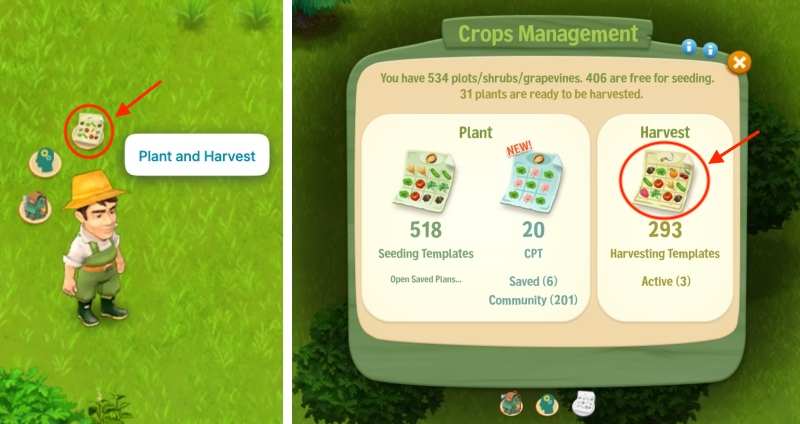
Hover over Joe, click the Plant and Harvest icon, then select Seeding Templates in the window that appears.
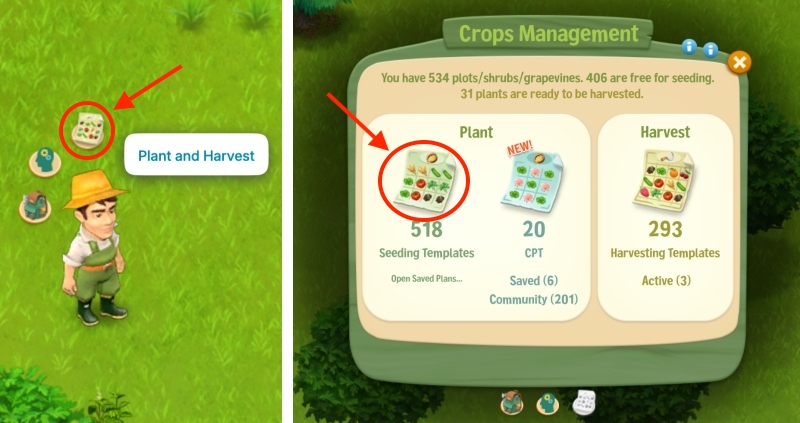
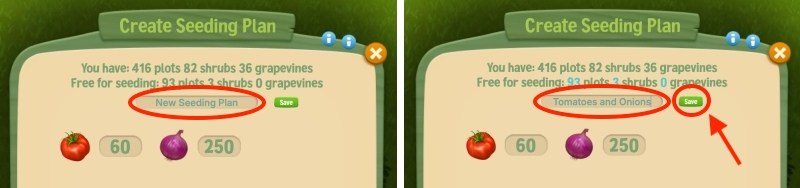
Then, click the Add Seed button at the bottom of the menu and choose the seed you want Joe to plant, let’s say Tomatoes.
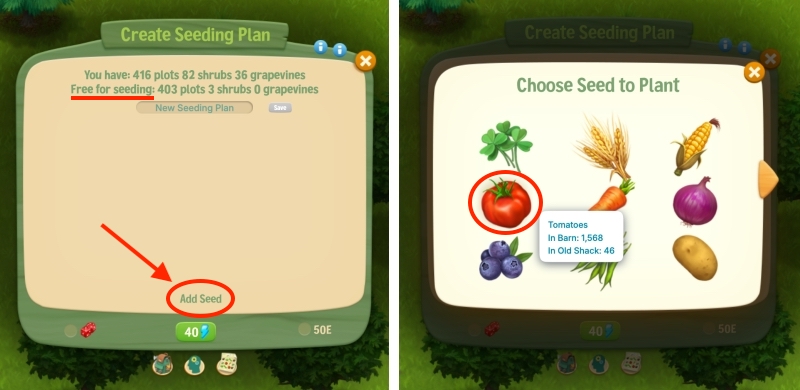
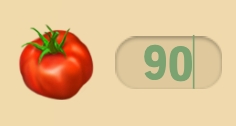
Click inside the box and write an amount. We wrote “90” in this example.
To add another Seed for Joe to plant, click Add Seed and repeat what you did for the Tomatoes — choose the crop and enter an amount.
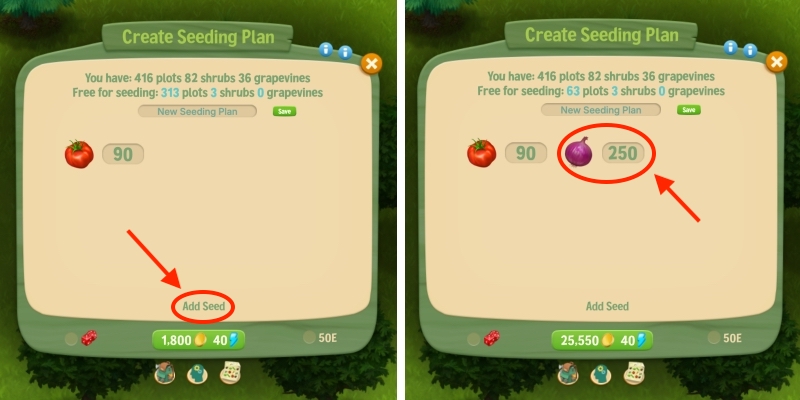
In the example above, we selected Onions and wrote “250” as the amount. Repeat if you want to add other plants.
To Save the Template for future use, you can give it a name at the top —we named it “Tomatoes and Onions”— then click the green “Save” button.
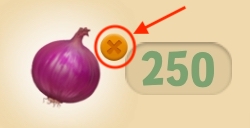
To remove a plant from the template, hover over it and click the X.
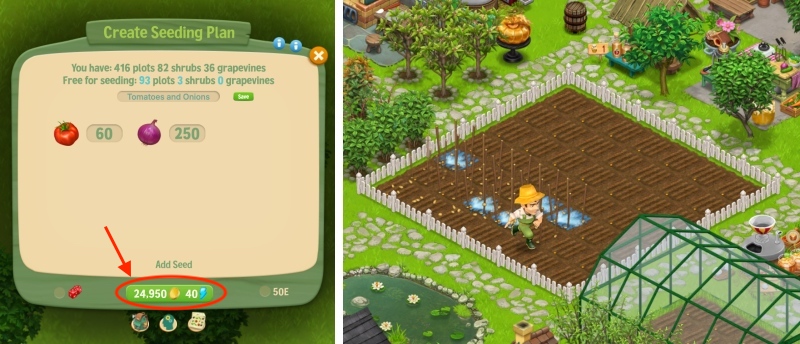
Once you’ve added your seeds, check the cost at the bottom. For 60 Tomatoes and 250 Onions, it’s 24,950 Coins. Joe also needs at least 40 Energy. Click the green button to start planting!
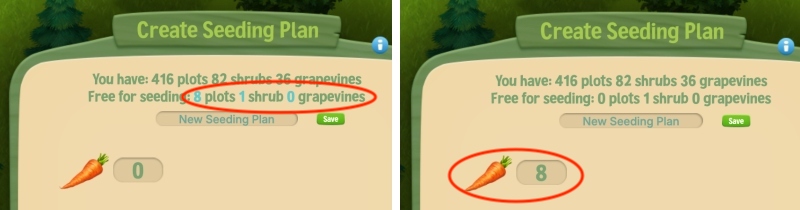
Why can’t I add 2 or 3 digits for the crops?
Make sure you have enough free plots, shrubs, or grapevines. For example, if only 8 plots are free and you try to enter 30, the number will automatically adjust to 8.
How to Harvest with Joe | Harvesting Templates
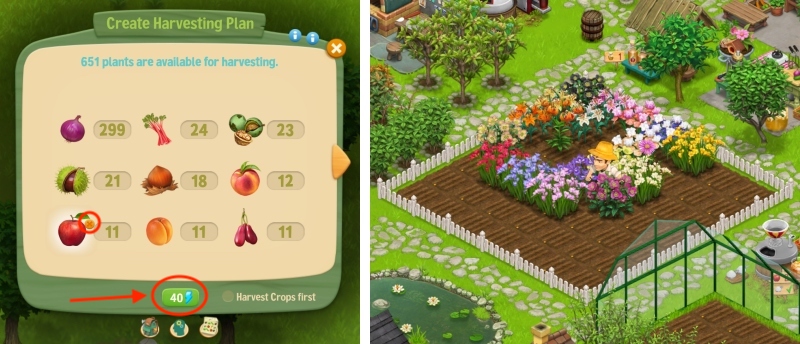
Hover over Joe, click the Plant and Harvest icon, then select Harvesting Templates in the window that appears.
Don’t want Joe to harvest something, like Apple Trees for a chance for Rotten Apples? Hover over it and click X to remove it. When ready, click the green button to start harvesting.
Using one Harvesting Template for all your Farms
You can use 1 Harvesting Template across your Farm, Bellflower Meadow, Cypress Grove, and Emerald Beach.
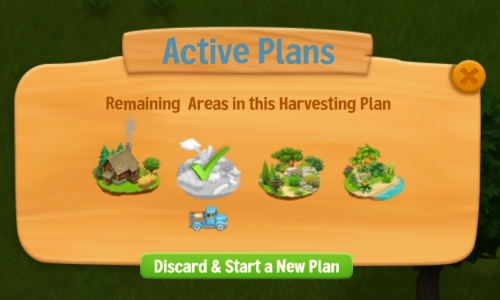
Joe can harvest all 4 areas for just 40 Energy. Simply move between the areas and harvest with Joe. Each area can be harvested once before starting another round.
For example, if you try to harvest your Farm twice without harvesting the other areas, you’ll be asked to discard the unused harvest and start a new plan (and pay 1 Harvesting Template and 40 Energy again). So, it’s best to harvest all 4 areas with Joe since it’s free.
Seeding and Harvesting Templates
Templates are pre-printed papers that tell Joe what to plant or harvest and how many.
- Seeding Template: Tells Joe which crops, shrubs, or grapevines to plant and in what quantities.
- Harvesting Template: Tells Joe which crops, shrubs, grapevines, or trees to harvest.
How do I get more Templates?
There are several ways you can get more templates:
- Plant and harvest manually — Earn a Seeding Template after planting your whole farm manually 3 times, or a Harvesting Template after harvesting it 3 times. Hover over a template to see how many more plots you need to manually plant or harvest before earning the next one.
- Tyrone’s Deal — Tyrone can offer you these for RC once he knows you need them. To get an offer, open the Truck, choose Tyrone’s Daily Menu, feed Tyrone a recipe, then deliver the order and collect your Coins and XP. Tyrone should have an offer for you afterward.
- Exchange — go to your Warehouse → Exchange tab and Frank will have some deals for you.
- Complete Daily Tasks.
- Participate in the Horse’s Show Jumping Event in BfM.
- As rewards for delivering chickens to other farms with Tyrone.
- Feed the Raccoon and wait for him to bring the rewards/trash.
Why harvest with Joe?
Only Joe can find Silver and Gold Star Crops and Fruits, because he knows how to identify them. First, send Joe to study the Silver and Gold Star plates he found after the storm. To see how to send Joe to study, click HERE.
What are Silver and Gold Star Crops and Fruits?
They are premium-quality plants that Joe can find on your farm while harvesting. They appear in your Barn with a Silver or Gold star over the icon and sell for much more than normal plants.
What do I do with Silver and Gold Star plants?
Once you can find Silver and Gold Star produce, a new Orders location called Le Cuizin (Fancy Restaurant) will unlock.
First, talk to its talented but temperamental Chef, Jerome. To win his trust, you’ll need to complete an Order within a certain time. If you don’t ship the Order in time, you’ll fail the task and have to wait for another day to become a Silver or Gold Star Supplier.
Silver Star and Gold Star plants are also required for the Silver Crates and Gold Crates, and Silver Recipes.
Energy
Like all humans, Joe needs Energy to perform actions.
- Planting or Harvesting: 40 Energy
- Picking up a mushroom or nettle: 2 Energy
- Picking up debris: 2–20 Energy, depending on its weight
Energy is restored automatically at 1 Energy per 1 minute, up to a maximum of 80 Energy.
Need more? You can give Joe Energy Bars or Carbohydrate Energy Gels from Shop > Specials.
To see all the various ways you can get more Energy, click HERE.
PS: You can find detailed info on how to find mushrooms and nettles in our Foraging article HERE.
Joe’s Skills
Over time, if you use Joe to harvest, his Harvesting Skill will increase. You can view his Skills by hovering over him and clicking the middle icon.
A higher Harvesting Skill means Joe needs to harvest fewer plants or trees to produce a Silver or Gold plant.
How do I control Joe?
- double-click on an empty area on your farm to make him move
- double-click while Joe’s on the move to make him run faster
- if he does not want to go because there are obstacles in the way, try to get him there in smaller increments
- if you want him to stay put, just click on his chair next to the Orders Board
- if Joe’s sitting on his chair, click on him to make him get up
When I click on something it says “Joe too far!”
You will have to move him closer and closer, with smaller steps:
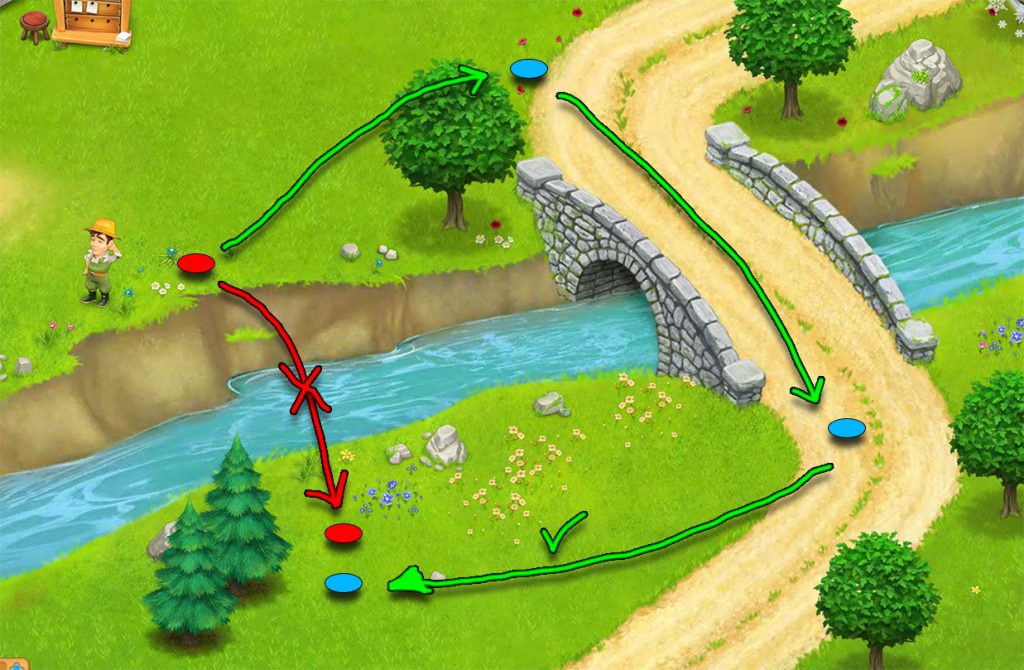
Joe does not have your vantage point and you will have to guide him. 🙂
Walkthrough of quests after hiring Joe
You can find more detailed information on all the quests after hiring Joe click HERE.