
You’re viewing older news · « Back to latest news
Smoother Farming, And A Big Pile Of Fixes
New and improved
- Neighbors: a new Favorites sort puts your starred Neighbors on top. The Neighbors Bar follows the same order.
- Neighbors: the name sort now ignores upper and lower case, so “jan” and “Jan” sit together. When two Neighbors have the same Level, they sort by name.
- Neighbors: sleeping Favorites stay in your list.
- Seedlings and Mentors: Enrolling now is started when you choose a Gift for a Seedling.
- Foraging: hover over a flower or mushroom to see its name.
- Kitchen: the “Make” link on an ingredient now correctly selects the right Recipe (if it is starred or not).
- Potted Plants: “Place” in the Shop now takes you to the nearest empty flower pot, every time.
- Farm Chat: your Neighbors are highlighted.
- Accounts: a deleted account now shows “Account Unavailable” instead of a loading screen that never ends.
Farm fixes
- Tablets: a Samsung S Pen can harvest and plant again, click lock included.
- Fixed the case where the Hedgehog doesn’t walk around when it is hungry.
- The Evaporator boil no longer stops at 2/3.
- Lemonade Stand: Pina Colada is back for players who own Halloween Mocktails.
- The Horse animations no longer slide on the way to the water.
- White Oaks on open land drop Acorns again.
- Blue Dot: new Shrub, Grapevine and Tree Beds now light the dot. A Shrub or Grapevine harvest clears it.
- Emerald Beach: the shovel on a Flooded Field now tells you when you hit the Crops limit, and opens Max Capacity.
- Certifying a farm right after you move Farmer Skill Points now sticks after a reload.
- Kitchen, Craft Shack and Log Cabin stove: the Automation ring no longer gets stuck, and the collect ring shows again.
- The Conveyor Belt Quest now counts only the right production.
- A Farm Kitchen Quest no longer gets stuck on “Clear Land”.
- Returning players now get the Starting an Orchard Quest, so the Broken Truck unlocks again.
- Coconut Ice Cream and Mango Sorbet now count for the Inside Scoop Achievement. Your old ones are counted too.
- Horse course results now arrive, even when a player in your group left the game.
- Botanical plates you studied no longer show “New”, and the Skills badge clears.
- Competitions: your Neighbors are marked on the board again, and the tally is correct.
- Gift requests: friends are no longer grayed out after the daily reset.
- The friends ribbon surprise Gift now counts Neighbors you added during the session.
Fewer “out of sync” reloads
We fixed many cases where the game had to reload. Some examples:
- Market sales made while you were on another farm now show when you come back.
- Foraging flowers can no longer be moved by mistake.
- Cats no longer bring a Neighbor’s play date or fight home with them.
- The Dairy Expert no longer makes an empty product.
- Ducklings, Asparagus Fertilizer and the newspaper no longer trip the game on tight timings.
- Gear you store or sell now put their products back into the Barn correctly.
Screens and menus
- The Quest Book no longer stops opening after one slow load.
- The Quest Book and the new Quest card now fit a short game window.
- Maple Syrup results: the syrup name no longer covers its quality.
- The Cancel button stays in one place.
- Notifications no longer cover the World Map button after a popup closes.
- Empty event boxes no longer block clicks under the XP star.
- Letters without an action no longer show a Send button.
- “Open News” now clears the News dot at once.
- Help links that moved now open the right page. The info button on the Plots to Work panel works again.
- Names with an apostrophe now show correctly in chat.
- Objects no longer jump on top of other objects when animals and characters walk by.
- The Prize Projector screen stays open while an ad plays.
- Game sound comes back when an ad does not play.
- Trackpad zoom is smoother in Safari.
Lower memory use on the Web Portal
We’ve identified and fixed the issue that was causing unusually high memory usage for Web Portal players.
After investigating, we found that the extra memory usage was not coming from the game itself, but from the external security checks used when loading the game. In some cases, these checks could consume several hundred MB of additional memory, even after the game had finished loading.
Speed and stability
- The game uses much less memory when you visit farms and open popups. Long sessions stay smooth.
- Some Android tablets and Chromebooks now load the art faster.
- We fixed many crashes found in our reports.
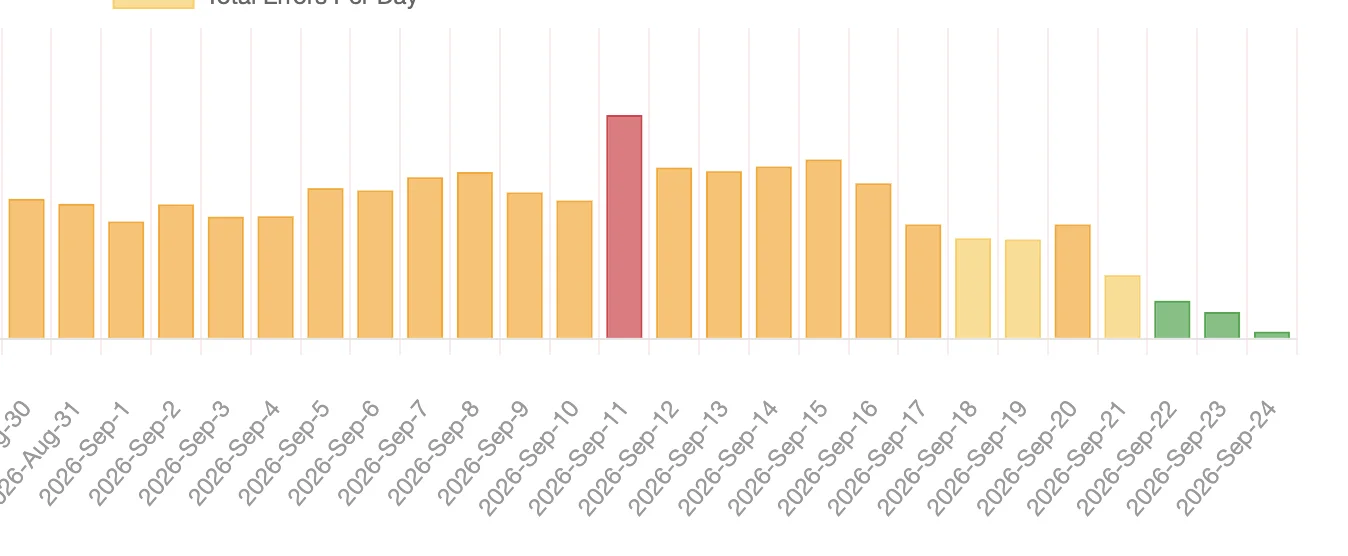
The number of errors in the game each day, of all types (5111, 5122, etc.) The green bars are the last days, after the fixes.
Facebook players
- News opens inside the game, in your language, with reactions.
- Settings: the white cursor now works, and a language change is kept after the restart.
- A slow download is retried before an error screen shows.
- Fixed an Instant Games zoom issue where zooming the game zoomed the Facebook page too.
Happy farming!
Migration Completed for Facebook Players
We’re happy to announce that we’ve completed the migration from Facebook Web Games, the platform that will close in September, to the new gaming platform, called Instant Games.
So, for Facebook players, everything is OK. This was it.
In regards to the top and bottom bars, and why we removed them:
- All links from those bars moved to My Account: News, Help, Gifts, Inbox.
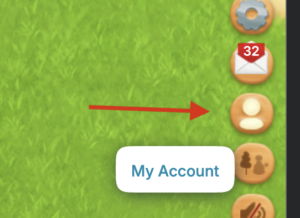
- We even created a new Inbox/Gifts button for you, so you can always see the Inbox, as you are accustomed to.
- On Web Portal, nothing is changed, the top bar is there.
- Instant Games migration was mandatory, otherwise the game would be closed.
- Instant Games is a platform that is accessed from multiple devices, and the game has to fit on as much of those possible. New platform, new rules, we adapted.
Please understand that we don’t make changes unless we have real reasons, as we know you don’t like this type of changes.
Upcoming Changes
There aren’t any planned. This was it.
The redesign of the XP popups and Neighbors was planned and sketched out for more than 3 years. It’s just that now we had the time to finally implement them. The UI is now completely redesigned.
All we have planned from now (and we have plenty) are:
- CLM classics like the Events (can’t wait to show you the Halloween Event).
- More classic content, based on your requests, like new plants, animals, gear.
- Some new features that we planned for more than 6 years. All this new content will be optional, on top of the existing game. More details in a future post, but it won’t involve more land like Emerald Beach, just a refinement of current stuff, intended for expert farmers and data lovers.
- More stories, Quests and adventures. You’ll get to know more about the Woodburn Valley’s people.
- Gameplay refinements.
- Finishing the loose ends in some places, the Mine being the obvious example.
Thank you, and happy farming!
Neighbors Changes For Facebook Players
Instant Games related changes
- Due to the mandatory Instant Games migration we are rolling out now, where we cannot retrieve player names and profile pictures (new Facebook rules), we switched to showing your Profile name and photo, as announced in News. If you wish for your Facebook Friends to recognise you, please make sure you add a Profile name and photo.
- List of Facebook Friends you can have as Neighbors is 100 (now all Neighbors are the same thing, and we increased the limit of 60 to 100). If you have more than 100 Neighbors you keep them, but they will overflow the limit, and you won’t be able to add more. If you want to add more Neighbors, we’d advise removing inactive Neighbors, or Neighbors that don’t send Gifts, until you arrive under the 100 limit.
- The part that really matters, the list of Neighbors you can send Gifts to is unchanged (60).
- Fixed a bug where the Facebook friend added as Neighbor disappeared at refresh.
- Instant Games don’t allow links to external sites, so for News and Help, we created a copy-paste system.
A Late Summer Vacation Menu
New Tropical Recipes! Be sure to check our Fan Page for more details, and where a cool (and useful) gift also awaits you inside the post text, as a Coupon Code you can claim from inside the game. And, don’t forget to LIKE and SHARE if you like making Recipes, and for more Gifts!
These Recipes are meant to patch the holes for the new Crops and Fruits, and we will add more in the near future, for the ones that still aren’t used in any Recipes.
Beautified the Cows
As announced before, we redesigned the Cows, and reordered them by their Milk production. Holstein is now the Cow that produces Milk the fastest, just as in real life.
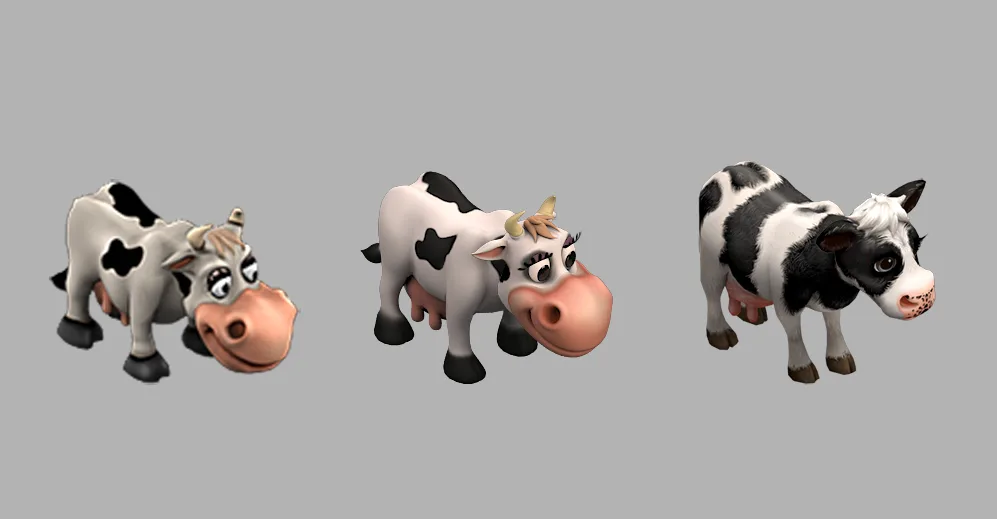
To the left is the original Cow from 2009, middle is the one that was replaced.
We hope you’ll enjoy their new look, and the few extra animations (they look at the trough and moo sometimes, to signal they’re hungry, whereas before we had no animations for the moo, the Cows were mimes.
In the game, we just renamed the IDs between them, so you have the same number of RC premium Cows you had before.
Improvements
- We massively improved the performance of the game in several areas, to best fit Instant Games upcoming launch, and overall game experience:
- for a maxed out farm, now memory is down from about 450MB to 360 MB. Our target was under 500 MB. When we initially started the optimization process, the game had 700-1000 MB.
- initial download size for a maxed out farm is significantly less too. This benefits players that won many Event animals, and also makes adding more animals in the future easier. Why – now the game loads their animations progressively, on demand. Before, it loaded them all at once.
- overall game size is 12% less, after some cleanup and optimizations. We went from Flash to HTML5, and all migration and refactoring left behind unused files that we now discovered and removed.
- Fixed Neighbors
- we refactored and simplified Neighbor list – now they are all brown, and your Facebook friends have a blue dot when you hover right over their name. Daily Players are in green.
- When you send Gifts to a Neighbor, now the inactive ones go to the bottom of the list, no matter what sorting you choose. This makes sending Gifts simpler and easier.
- Added smooth scrolling for the list.
- added Filtering, and separated Zzz Neighbors into their own list, and separated them by how long they are sleeping, longest at the top.
- fixed a long-standing bug that didn’t show you Neighbors to add in the Add More! tab.
- over a hundred of small layout fixes and other tiny fixes – input fields, out of place layouts, popup performance improvements, animation fixes and improvements, QOL improvements.
Other
- Added Deer, Baby Deer, Baby Chicks, Ducklings, Duck, Drake and Raccoon to the Gallery, so you have more Profile pic options, beside Quinoa.
- Added 2 more Badges for the Badges board – Recipes Rank, where the badge gets automatically upgraded to the next one, and Competitions Winner. Now you can fully reorder your Business Card.
Happy cooking!
More Gifts, And A Novel Way To Help Beginners
Seedlings / Mentors
A completely new class of Neighbors, called Seedlings (lvl 1-20) and Mentors (lvl 50 and above). These don’t count towards your Neighbor limit, and give special Gifts, such as Fuel or Energy, sometimes. The feature is meant to make new players feel immediately welcomed, and the experienced players get both special Gifts and a Graduation Plaque plus a Totem, depending how many Seedlings they graduated. This is opt-in.
The feature is highly BETA, and we don’t know how it will play out, and what the behaviors will be, since nobody has something similar. So, don’t expect much. We might keep it, we might retire it.
How it works, here: https://clm.beetree.games/help/friends-and-neighbors/the-gifts-greenhouse/
New Neighbors popup
- New Neighbors popup, with Activity popup merged into it for simpler use. Due to upcoming changes with Instant Games, Facebook Friends tab was replaced with the little Facebook icon, in the Add More! tab.
CLICK ON THE NEIGHBORS ICON TO OPEN ADDING NEIGBORS POPUP! - New Neighbors bar, with scrollable Neighbors list, and the Neighbors popup accessible even when the bar is closed (just click on the icon).
- New Community page, accessible from inside the Neighbors popup – it’s a BETA feature, like a newspaper feature about what other players are doing. With charts, for data lovers.
XP Popups redesigned
We simplified all those popups, with detailed and suggestive animations.
- Now, depending on your level, you get intermediate Gifts! Some of you were asking for this for a long time, but only now we got the time to do it properly. Open the Progress tab to see them. we add an extra Gift at levels 25, 50, 75 and 100.
- An all-new Estate tab, for stat lovers.
- Max Limits now has been completely redesigned, with suggestive animations that hopefully will help you understand the core principe of how it works (you take from a category to put on another).
- Redesigned Badges, with a badge board, and badges you can drag and drop and rearrange. The order you arrange them left to right will be the same order you see them on your Farmer Business Card. Except Competitions Winner and Kitchen Ranks.
- Ranks now extend far out and are much more social, showing players in front of you, and on third page you get to see the Hall of Famers in Orders and Kitchen.
New Chat
- Completely redesigned the Chat window to be in HTML. This means natural scrolling of the window, better performance, emoji, and it even has themes, so you can complain how devs ruined the game in beautiful Meadow, Cream, Soft Autumn, Soft Summer and Night themes.
- To visit chat participants’ farms, click on their name to open the Farmer Business Card, and below you’ll find the go to farm buttons.
New Barn 0 Qty filtering options
- Click on the 0 Qty text to see a dropdown menu, showing much more filtering options for your zero quantity items. This was made so that, if you want to have stock only for what’s required for the Train, Orders, or for the Stock Master/Wizard Badges, you can now see only that.
All remaining popups/ HUD redesigned
- all remaining game popups also got a fresh coat of paint, with clearer and simpler layouts.
We gave a modern fresh coat of paint on all remaining popups that had the old look.
Bug fixes and improvements for the Crop nobody will ever grow again once they complete the Quest for it (Asparagus beta fixes)
- Completely rewrote the Asparagus article, based on your questions and feedback. Link here: https://clm.beetree.games/help/general-gameplay/asparagus/
- Reduced Asparagus Harvest Period from 1 hour to 30 minutes.
- Fixed a bug where, in certain click&drag conditions, it rewarded more Asparagus Seeds, thus contradicting what we communicated, that seeds are given only after the 4th cycle. So, instead of activating the script to remove these seeds from your account, we left them. Why – if you have enough Fertilizer to spare, you can “cheat” the game a few times, a feature we left for you to discover. Meaning, you can use Fertilizer to skip the growing time up until the harvesting period. Then you can delete the Asparagus Crop and put another one, without waiting 22-72 hours. The Asparagus Seed Box contained 20 Seeds and you can only plant 12, so the extra 8 was for you deleting Asparagus by mistake, or for this trick. After these 8, if you deleted, it’s 2RC/Seed.
- We added a info popup after pruning first 2 times, where the majority of players thought is where they get the Seeds. The popup tells you that the Harvesting Period will begin, and you get the Seeds after 4th cycle.
Quests and content unlocking
We understand that you feel compelled to do all Quests. For future releases we will try to make these actions opt-in, so YOU choose when the Quest appears in your Quest book.
In this case, the story was that Molly calls you to ask for stuff, to show how “in your face” she is. But future releases will have you decide when to click/install something, as much as we can.
Cat Fixes
- Fixed Cats sleeping on the bowls.
- Fixed a certain situation where the Cat was over the river, hungry and sleepy, and couldn’t get home.
- Paused them following the screen if they’re really hungry while you have scenes or dialogues playing.
The Asparagus Takes Three Days To Do Nothing
Asparagus, Quince Tree and Mulberry Tree are here! Be sure to check our Fan Page for more details, and where a cool (and VERY useful) gift also awaits you inside the post text, as a Coupon Code you can claim from inside the game. And, don’t forget to LIKE and SHARE if you like asparagus, quinces, and mulberries, and for more gifts!
Asparagus
A first in our game, the Asparagus has 10 little plants for each Crop Field, each one with 8 individual and unique stages (cases), and probably is the most accurate to real-life perennial crop in the game.
The Asparagus Photoshop file was a test of will, and during developing it was a lot of “I don’t think we’re gonna pull this one off”. But we believe we did – the tiny Asparagus patch you create will allow incredible variety, it will look very similar to a real-life one, and hearing those Asparagus Spears popping up and snipping them (with click locking) can be fun and addictive.
All about Asparagus here: https://clm.beetree.games/help/general-gameplay/asparagus/
There’s even an Achievement for it – Spearfect.
Asparagus is Farm only (limited seeds, you could move them to Bellflower or start directly there, or plant some in Farm some in Bellflower and it would get buggy and confusing really fast, with 4-8 cases where it could break). So, better to keep it simple, for now.
Plant details
To everyone who wrote to us about plant details, thank you! We’re very impressed by how attentive you are. Some of you pointed out inconsistencies you noticed in our classification of the plants. Surprisingly, a few of you also wrote to say that you were glad to see tropical plants moved to Emerald Beach and Mediterranean plants moved to a more appropriate Mediterranean climate. This was unexpected, as we were only expecting backlash over the move.
We hope the new Asparagus crop, along with some new features we will release this year, shows that botanical accuracy and thoughtful plant classification are things we care about. As you know, we have short paragraphs describing most of our plants, something games don’t usually bother to include. We like to think this gives the game an educational aspect as well. We mix light humor with interesting facts about plants, and perhaps young players read them, grow passionate about plants, and eat more veggies. 🙂
Of course, please keep in mind that this is still a game, and sometimes we need to adapt certain things to meet technical and gameplay requirements.
Quince Tree and Mulberry Tree
Two semi-classic Trees to compliment your temperate-continental farm landscape. Active in Farm and Bellflower Meadow.
Fixes and Improvements
- About 10 more Cat fixes and improvements.
-
Fixed Joe only respawning at exit points to other Areas. Now, if his chair was nearest at game closing, he respawns near the chair on refresh.
New My Account section (WIP)
For our existing Facebook players, as part of our preparation for Instant Games, we’ve added the ability to upload your own Profile Photo and choose your own display name.
We have now confirmed that, for Instant Games, Facebook discourages games from retrieving a player’s Facebook Profile Photo and Name across games. This is, we believe, so they can let you play the game immediately, no permissions required. So instead, we created our own profile system, giving you full control over what you share and with whom.
For Facebook players, this section will run in parallel with the current system, until we transition to Instant Games.
We created this feature specifically based on feedback from our veteran players, many of whom told us that you’ve been accustomed to seeing the same friends in your Neighbors bar for years. So, if your old friends choose to upload their Profile Photo, nothing will change for you. You’ll continue to see them just as you always have.
You can choose to share your Profile Photo and Name only with your Neighbors, only with Facebook Players, with both, or with neither. You’re in full control of your privacy settings.
Your uploaded photo will be saved at 100 × 100 px, which is the maximum resolution we need in the game. We won’t store a larger version than necessary.
There’s also a practical benefit: the Neighbors bar and other lists involving Neighbors will load faster and run much more smoothly.
And yes, this feature is also available on the Web Portal.
A “We put back” Day
Automation panel, made to work as before
- Click on the Automation icon (the blue gears) to open it. One click to open it and show the Automation buttons on the farm, one click to close it.
- The value bar opens the More OP popup, where you also have the functions of the Automation panel.
Harvesting plans now work on all Areas, as promised when we launched Emerald Beach
-
With a single Harvesting plan, you can now go all Areas and harvest there with Joe.
- Custom popup so you can always see remaining Areas where you haven’t use a Harvesting Plan. Joe’s Plant and Harvest popup > Active (0)
Cats
- Fixed the Cats sleeping. The server registered their sleeping times correctly, but on your computer, depending on when you entered the game, it got stuck. This made the cats requiring sleep, which ironically, was the exact opposite of the initial impression we wanted you to see. Our nr. 1 design goal was: you enter the game, feed the Cats, see them running happily for a while.
- Restored Tabby Cat searching for flowers in the farm, if you don’t want to go to other Areas.
- Made the Cat Food Recipe yield 10 Cat Food instead of 7. So with one click, you have plenty of Cat Food for your Cats.
- Cats can be fed and watered with their animations OFF, just as before, for players with really slow computers. Also, they can be petted, if you wish to do so. Only thing requiring animations turned ON is playing.
- TIP: Don’t have Cat Food, and the Cats are following you around the farm asking for food? Add them to the Warehouse so they can shut the heck up for a bit while you make the food, then place them back on the farm when the food is ready.
- Use Coupon Code 50CFMEOW for 50 Cat Food.
- We’ll continue to adjust based on your feedback. There are 128 files and 23.800 lines of code related to the cats, so fingers crossed, let’s hope they behave.
Crops, Shrubs and Trees from Cypress Grove and Emerald Beach
- We put them back for your Farm and Bellflower Meadow, temporarily. Why?
- Although we announced it a few months ago and even left them months past their due date, and announced this again, some players never got the chance to read the News. So now they are back for 2 more weeks, with giant countdown labels on them explaining where they will be moved.
- Before this we didn’t have any feedback from you, and we got plenty these days, to adjust the numbers and add features you suggested.
- Increased the max limits for Trees, Shrubs and Crops, for Cypress Grove and Emerald Beach, after your messages you need more to stock up and it’s not enough plants. With a heavy skew towards first land plots. Now they’re as follows:
- Cypress Grove
- Trees – from 60 to 75
- Crops – from 70 to 100
- Shrubs – from 45 to 45 (unchanged)
- Emerald Beach
- Trees – from 53 to 65
- Crops – from 140 to 155
- Shrubs – from 29 to 30
- Cypress Grove
- Two more ways to get your produce from Cypress Grove and Emerald Beach, for your lemonades and recipes:
- Added 2 special pages at the end of the Newspaper, highlighting players that put produce from Cypress Grove and Emerald Beach on sale.
- Tyrone now sells produce from Cypress Grove and Emerald Beach too. Never underestimate his love for a quick Coin.
Fixed Ducklings flying without you seeing them
Now, the Ducklings are ready to fly popup appears first, and the new button says Claim & Wave Goodbye appears. The ducklings will wait for you to say farewell. You click the button, and it will take you to see the Ducklings fly away. Then, the reward will appear.
Shorter animations for the Quest popup (and very soon, Ribbons)
We designed them in the beginning with fancy animations as proof of concept and never got the chance to fix their duration. They were so long that even for us in testing, instead of being a moment of joy, it was one of un-zen vibes. You will be able to close/claim both in 0.5 seconds, if you want.
Find items on your Farm button
Hover over the World Map, and a new button with an arrow will appear. If you click on it, you can search any item you have on your Farm and go there.
Started curating the Crop Patterns (later edit)
Deleted all copies of an original (we automatically see who originally posted a design and what it included – we reward originality), deleted all pink birds, the 5 red-green dots, and ducks (the examples the feature came with). Also permanently approved some designs that got reported (by mistake, probably).
We will also delete low-effort designs, as stated in the feature. This includes very simple designs, but also slight variations of a work of other creator. Acceptable would be drastically different solutions to a complex pattern, but where there are 3 colors in a simple pattern and only 1 plant is changed, it’s too similar. Perhaps these are better suited for the Facebook groups or similar, where you can debate the best solution, because there you can post how it looks too.
It’s also not a fun experience for players to browse and see the same design multiple times.
We don’t have a high bar, but we need to keep the feature interesting. So far, you did pretty nice looking stuff.
Developer Notes on the moving Crops, Trees and Shrubs
First, thank you. So many of you wrote to us here and on our Facebook page, and we read every message, the changes above came straight from them. Your passion for the game is what pushes us to do our best.
We’ve put the whole story, what’s moving, why, and how everything is kept, into one article:
https://clm.beetree.games/help/general-gameplay/plants-moving-and-why/
The short version, and the questions you’ve asked us most:
- Just a few farms, kept simple. Four places to own land, and no plans to add more, so the game stays easy to keep up with rather than a farm-after-farm grind.
- Your game stays your game. Planting and harvesting stay exactly as they are, and we’re adding more Trees, Shrubs and Crops than we moved, so your Farm Shop ends up bigger than before.
- Everything stays. The moved plants live on in Cypress Grove and Emerald Beach. Prefer to stay home? You can still get their Crops and Fruits through the Newspaper and from Tyrone. We also raised the limits in both Areas, and we’ll keep adding your suggestions there wherever we technically can.
These plants have been part of your game for years, and they remain part of it. Thank you for growing with us.
Facebook players and Instant Games migration
Part of why we’re doing this now is that we’re bringing the game to more platforms, including Facebook Instant Games, which needs a light, fast game to run well.
If you are a veteran Facebook player: your farm stays yours, in full. Moving to Instant Games simply means the game is moved to this new, lighter structure, and your farm and all your progress carry straight over. A few smaller things may change depending on what Facebook supports for Instant Games (related to Facebook’s new infrastructure, not the game), but everything you’ve built stays with you.
All-new cats behavior and new way to control your Gear from everywhere
Be sure to check our Fan Page, where a useful gift also awaits you inside the post text, as a Coupon Code you can claim from inside the game.
1. All-new cats
We’ve completely redesigned how cats work, to make them as close to real life as possible. There’s not much to learn if you own a cat. They’re cats, and they behave as such.
This is a free upgrade for everyone who already has them, and the cats’ RC price in the Shop hasn’t increased.
Cats article here: https://clm.beetree.games/help/animals-and-pets/caring-for-your-cats
Cats key features:
- When they’re happy and well taken care of, they dart around the farm together, playing. Then, if they’re tired from all the sprinting, they take a quick power nap to regain their energy.
- When they’re hungry, they fight with each other. If they’re REALLY hungry, they’ll also chase you around the farm, meowing, until you feed them. They can be a real pain in this regard, just like real cats. If they’re only mildly hungry, they’ll just meow to let you know. Failing to feed them for a long while will make them feel neglected and will break their mood. Luckily, making them happy again takes just one click to feed them. After feeding, they’ll groom themselves and get back to their cat business. If you don’t want any of this, you can put the cats in the Warehouse.
- You can now water them. This means topping up a water bowl, and the cat will come to drink from time to time.
- You can now pet them (a simple click, 4 times a day) to strengthen your bond with the cat. You can also brush them. To brush the cat, select the Cat Brush from the third tab and rub it over the cat repeatedly, until you see “The cat is brushed!” If you’ve already brushed the cat (check the tooltip over the brush in the popup to see) and try to do it again, the cat will run away, or even hiss at you.
- Assigning a Cat Bed or a Bowl to them is about as useful as it is in real life. Meaning, they’ll eat from whatever bowl they want, and sleep wherever they want.
- If both cats are hungry, it’s first come, first served, and the winner will hiss at the other cat to guard the food bowl.
- We’ve removed the wake-up horn for both cats and the dog, and added a gentle bell instead.
- An all-new Care System for each cat, with Health Stats (Hunger, Thirst, Energy and Mood), Bond Stats (Feeding, Watering, Playing, and Petting & Grooming), and Toys & Homes (Cat Homes & Accessories, and Toys). This is part of our new Animal Enrichment feature, which will let you take better care of your animals, and will expand to more animals in the future.
- It’s advisable to place food and water bowls 5 Crop Fields apart, because in nature cats think food near water might be spoiled, and prefer them separated.
- For the Playing activity, you need either a Whisker Tree Haven or a Cat Cottage, so the cat can play with the Mouse on String Cat Toy.
- When all 4 Bond Hearts are full, the cat will slow blink at you (a cat’s kiss), and a heart bubble will appear over its head. This means the cat absolutely adores you.
Cats key technical changes / bug fixes:
- We’ve changed the Milk to some proper Cat Food (well, at least the best we had up until level 24, where the Bombay Cat is). You make Cat Food in your Kitchen, and 1 Recipe made adds 7 Cat Food to the Barn. So the food situation is easy to manage. Water is free — you just click on the bowl from time to time to top it up.
- Hundreds of small improvements to how they work.
- The Tabby Cat now only hunts in the Factories, the Water Sawmill and the Bellflower Meadow, as intended by the original code.
- If you place the Tabby Cat in the Warehouse, it will remain there when you go to the Factories. Them appearing in the Factories was a bug that didn’t make sense.
- If, while you’re flower-hunting with the Tabby, it gets exhausted from all that sprinting, it will take a short power nap to recover, and if the hunting time is up, it will run back home. So no more forgotten cats in random Map Areas.
- Cats are now loaded more efficiently, improving your load time.
Why the cat redesign?
The old way cats worked was confusing and robotic, and the cats behaved differently from each other. Now they behave the same, with the exception of the Tabby, which can also hunt for moles (flowers).
Usually you get this type of animal behavior in games that are dedicated only to this, not in farming games, where you normally get some basic things, or just an animal that sits and blinks.
This redesign was extremely complex, with lots of new code, but even in testing, when you often have to recompile for the 200th time to check the features, we found the cats tremendously entertaining. They often did something unexpected that made us laugh, and we ultimately did this as a way to get a daily laugh for you, and a way to feel more relaxed and calm. This is a game, and games should make you feel good. Caring for animals that reward you with their love in a visible way does that, we believe, in a small way.
The cat features are in Beta, and we’ll adjust them based on your feedback. We’ll also continue to improve their behaviors.
2. Control your Gear from everywhere
Controlling your Gear just got MUCH more powerful. The main issue with the Gear in the Factories was that you didn’t have a way to know what it was doing there. Also, always having to scroll to get to the Conveyor Belt was tricky. We’ve improved that in a few ways:
- A new dedicated button called Gear Remote Management, which shows you at a glance how many Gear are working. You can turn it on/off from Settings. This means you can control your Factory Gear from wherever you are.
- A new load bar for every Gear you have in the Factories.
- Extended info on whether the Gear is placed on Concrete Tiles or under a roof.
- An idle state on the Automation buttons for each Gear, indicating why it’s idle when you hover.
- The small computer in the bottom left opens the big computer screen with some nerd stats, such as the EFF — Gear Usage Efficiency — indicating the percentage of your Gear that’s working.
- There’s even a warning system for when your Gear goes idle (under the popup close button). From there, you can select below what percentage the load bar around the HUD button stays open.
- With these options, in Competitions you always know what your Gear is doing. And later, if you prefer to farm to relax, you can just turn everything off.
- You now open the Automation panel by hovering over the OP Bar and clicking on the Farm icon. This might be different for players who got used to old way, but we needed to make all Bars behave the same, make this panel have all data visible, and make it easier to use (once you get used to it). To get used to this, just hover over the Bar 3 times for 0.5 seconds, then click on the wheat icon. Then, double click anywhere on the Farm to cancel.
Gear article here: https://clm.beetree.games/help/general-gameplay/control-gear-factories-area-farm
These two features, the Gear Usage Efficiency and Animal Enrichment, are a preview of newer things to come, and of the direction the game is going. Gear is precision, perfect control. Animals are chaotic but easy to manage, and reward you with their love if they’re happy.
Other changes:
- There’s a countdown for when the Trees / Crops / Shrubs will be removed from the Farm Shop. Since we let them in the Shop WAY more than initially announced, the ulterior removal of Trees that you placed on your Farm will also happen sooner than initially announced.
- We soft-launched the multi-language version of the game, with 9 extra languages, for our international players. This was a monumental task, having to extract over 13.000 keys (bits of text) from over 700.000 lines of code and hundreds of FLA files. This also was a great opportunity for some English source hygiene, that our english-speaking players will benefit from. Over the years, the game evolved, and so the notions inside it. Thus, we had to fix lots of text inconsistencies, establish some in-world rules and stick to them. We developed a glossary, do-not-translate terms (Achievements), in some parts we did transcreation (adapt the text to a native equivalent), and hundreds of little things to ensure the best translation quality possible.
- In order to be as accurate to real-life as possible, we might switch the cows between them and their properties, because in reality, the Holstein is the cow that produces the most milk. So, if you bought 3 Montbeliardes, they will transform into 3 Holsteins, as a simple example. You will have the same 3 premium cows as before. Order will be: Ayrshire, Montbeliarde, Holstein.
Happy farming!
Gameplay tweaks – Emerald Beach
Decreased fruit cluster Energy
Based on your feedback, we decreased the energy cost for collecting Fruit Clusters from 6 to 2 Energy.
Increased Joe’s base Energy by 20
We increased Joe’s initial Energy from 60 to 80, so when you return to your Farm you’ll have more available.
Increased Truck’s base Fuel by 5
Initial fuel was 10, now it is 15. When you log back into the game, you’ll find more available.
Wild plant regrowth
Regarding feedback about wild plants regrowing in Emerald Beach, the goal of this area is for it to feel slightly more overgrown than others.
The wild plants generators are working as expected. However, the main issue we identified is psychological – you clear an area, then go to other area, then come back in 5 minutes and see that plant there. You feel you got tricked, even if the plant is set up for 48 hours, and it was due to reappear. For this, we are trying a new concept, in which after you cut something, the generators will wait until next day. This way, you will have a sense of completion and breathing room.
It is too early to determine how fast plants are growing, as we are still observing how you interact with land in this area.
The increased Energy from 60 to 80 should more than compensate for this, especially considering that you can plant on your plots of land and use Jungle Mulch.
We also noticed players can plant large Palm Trees on purchased land, which was not intended, and it’s a bug. Similarly, moving Fruit Clusters was not part of the original design. We initially planned to patch this, but we are currently monitoring it, since you also developed some interesting emergent gameplay strategies.
So far, what you did with the land looks very good, tropical, and better than we thought it would.
Finally, we now have the framework in place for adding more plants, both on the farm and in this area.
We might delay the removal of tropical trees and plants from the Temperate Continental Shop for a day or more, until we check how it works with latest tweaks, and we remove the beta label from Emerald Beach.
Other gameplay tweaks & improvements
- Date Palms – You can now harvest Dates and replant Date Palms in Longshore Beach.
- Longshore Beach herbs – You can now harvest herbs that regrow in certain areas in Longshore Beach.
- Move tool – “as it was before” settings – In response to complaints from some players about the new move tool, we added two settings that together restore the previous behavior:
- Show Move Guides (page 2): hides the areas of nearby objects when moving
- Classic Move Tool (page 6): objects do not lift and snap to grid, as before
- Joe’s “outside screen area” setting – In response to complaints from some players about Joe’s pointer, we added the Off-screen character indicator setting that hides the circle with a pointer, when he is outside the screen (page 2).
- Increased the wait time for quest quotes so they can be read before they disappear.
- Improved Rice Field seeding by showing sack animations when using the “Plots to Work” tool.
- Joe can now use Harvesting Templates to harvest in Emerald Beach.
- Bees from Beehives now pollinate plants while in Cypress Grove and Emerald Beach too, if the Beehives are on Automation, and use 1 OP per pollination.
- Accessibility Setting – In response to players who can’t see well, now the Bigger Fonts setting will make canvas character’s speech bubbles (the ones from cutscenes, that involve multiple characters) wait until you click, to move to the next one. This way, you have time to read them without feeling rushed, at your own pace.
Bug fixes
- Fixed a move tool glitch where the active zone got stuck on random objects, and another where fences behaved incorrectly
- Fixed an issue where calling the Truck to your Farm from other areas no longer showed the Truck.
- Relocated loot dropped behind mountains in Emerald Beach so Joe can pick it up.
- Fixed the Jungle Stop Quest from Emerald Beach not counting cleared objects.
- Fixed clouds in Emerald Beach not being cleared for some players who completed the Jungle Explorations Quest.
- Fixed the Trail Machete not being equipped by Joe and not appearing in Engineering after it was produced.
- Fixed Dynamite Sticks being received twice by some players.
- Fruit Clusters somehow picked up by Joe in the Backpack are now transformed into loot and transferred to the Barn.
- Daily Tasks now count produce made in Factories.
Emerald Beach beta release bug fixes and improvements day
Use code EB4RICE for 20 bags of Fertilizer 20. This should fix the fertilizer you used to complete the Rice Quest fast.
Beehives & Bee Skeps
- In response to your feedback that you have to be in the active Area to make Bees work, we will make Beehives and Bee Skeps work in Emerald Beach, Cypress Grove, Bellflower Meadow while you’re on your Farm playing, or any other combination. We’ve already managed to make it work, but it gives a few errors, so more testing is needed.
- Made all Beehives and Bee Skeps transportable to Emerald Beach too.
- Added Bee Skeps in Cypress Grove Shop.
- Will make Beehives available in the Shop soon.
These changes will make completing Honey Collections sensibly easier, if you arrange your Beehives well in Bellflower, Cypress Grove and Emerald Beach. Set them up, then drive to collect. 6 clicks.
Bug Fixes
- Fixed Dynamite Plunger not working. Obviously we tested it, but this was generated during a particular reset, and the sequence didn’t know where it was in the line.
- Fixed a 5300 error for Rice Fields, that was generated using multitool (149). This caused the Quest progress not being counted. Plus a few other small glitches fixed.
- Fixed a couple of Quests not working properly.
- Many small usability improvements that should make your progress more intuitive.
Overall, not so many bugs compared to other releases, given how many novel systems we implemented in Emerald Beach.