
Table of Contents
- Expand & Collapse your Neighbors Bar
- Add More Neighbors
- How many Neighbors can I have? | Managing Neighbors
- Invite FB friends to be your CLM Neighbors
- Sort Neighbors
- Neighbor Key
- Disable “Appear in search for Neighbors”
- Farm Chat
Farming is A LOT more fun when you play with your Neighbors. Whether playing casually and sharing farming strategies or competing against them in Competitions, Neighbors bring lots of benefits.
CLM is a social game designed around cooperation, so you will achieve many tasks significantly faster when having many Neighbors to send you gifts, special ingredients, construction materials and other required items. Also, they can be a great source of inspiration in farm design and game progress.
Expand & Collapse Neighbors Bar
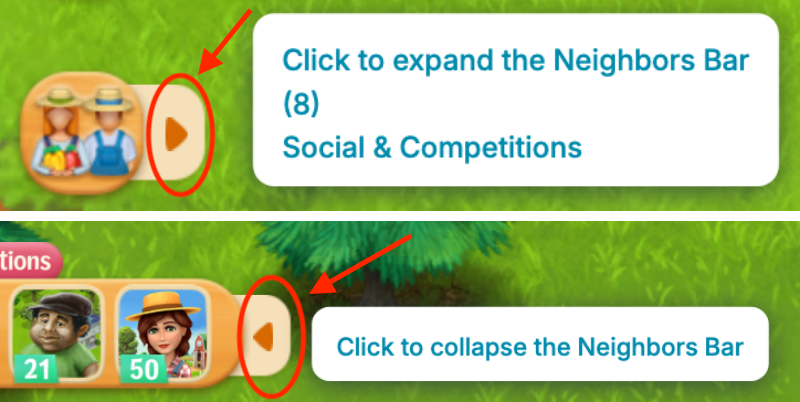
To expand your Neighbors Bar, hover over your Neighbors button and click the right arrow.
To collapse your Neighbors Bar, hover over the right side of your Neighbors Bar, and click the left arrow button that appears.
Add More Neighbors
The new Add More! tab allows you to find CLM players to add to your Neighbors bar.
To invite a player, click the Invite button. You can also click to view their business card — to the right of the “Invite” button.
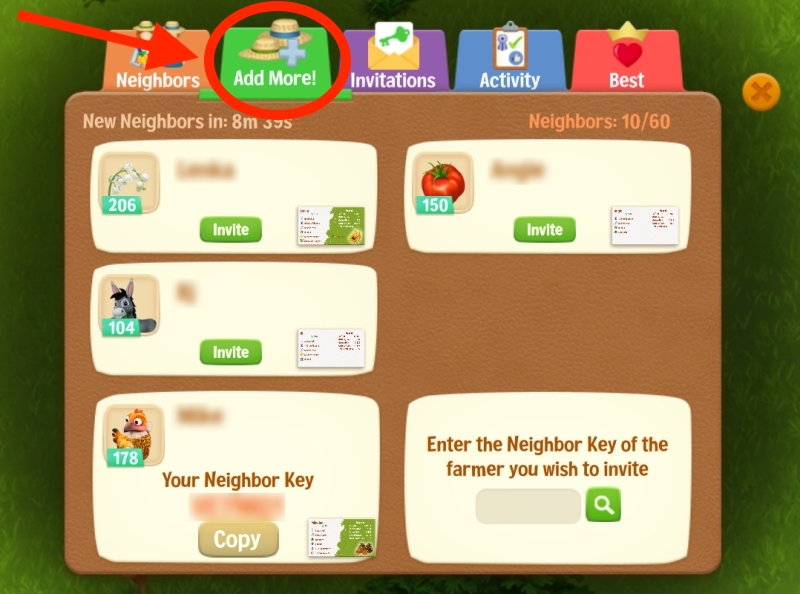
You receive Neighbor invites in the Invitations tab, to the right of Add More! and choose whether to accept them or not.
What do the colors of Neighbor names mean?
- Green — Daily Player. A gift reaches them today.
- Brown-Orange — Awake, but not a Daily Player.
- Blue to Dark Purple — Asleep (10 days, 3 months, 6 months or more since their last visit).
How many Neighbors can I have? | Managing Neighbors
How many Neighbors you can have depends on where you play:
- Web Portal: 150 Neighbors
- Facebook Instant Games, CrazyGames, other: 100 Neighbors
To see your count, open the Neighbors window and go to the Add More! tab. It shows Neighbors: 87/100, for example.
Who counts
- Every Neighbor counts: farmers you met in the game and Facebook friends.
- Invites that are still waiting do not count.
- Your Mentors and Seedlings in the Gifts Greenhouse do not count, unless you are also Neighbors.
Playing in more than one place
- The limit follows the place you play in right now.
- Say you have 120 Neighbors on the Web Portal, then open the game on Facebook Instant Games. You keep all 120. You cannot add more until you are under 100.
- The game never removes a Neighbor to fit you under the limit.
When you are full
- The Invite and Accept buttons turn gray.
- If you try to accept, you see “Max Game Neighbors reached.”
- Invites to Facebook friends still go out, but they ask your friend to play, not to be your Neighbor.
- Neighbor requests that reach you while you are full are turned down for you.
When the other farmer is full
- You see “Player has too many Neighbors”.
- Nothing is wrong with your Farm. Try again later, or pick someone else.
Making room
- Open your Neighbors Bar, find the farmer and click Remove Neighbor. Confirm.
- You can also remove several at once from the Neighbors window.
- Removing works both ways. You leave their Neighbors Bar too, and both of you get a place back.
Invites
- An invite nobody answers is gone after 7 days.
- If you cancel an invite, you cannot invite the same farmer again until 7 days after you first sent it.
- A farmer can have about 60 invites waiting. After that, new invites to them do not go through.
Finding new Neighbors
- In the Add More! tab you get a new list every 15 minutes.
- You can also search for a farmer by their Neighbor Key.
Invite FB friends to be your CLM Neighbors
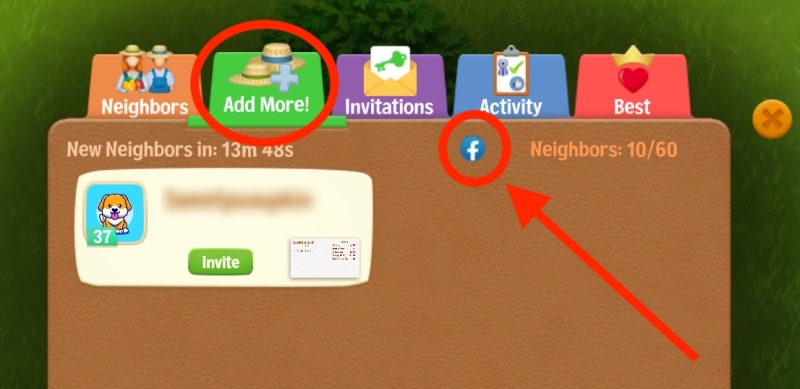
To add Facebook friends as your Neighbors, click the FB button in the “Add More!” tab.
Sort and Filter Neighbors
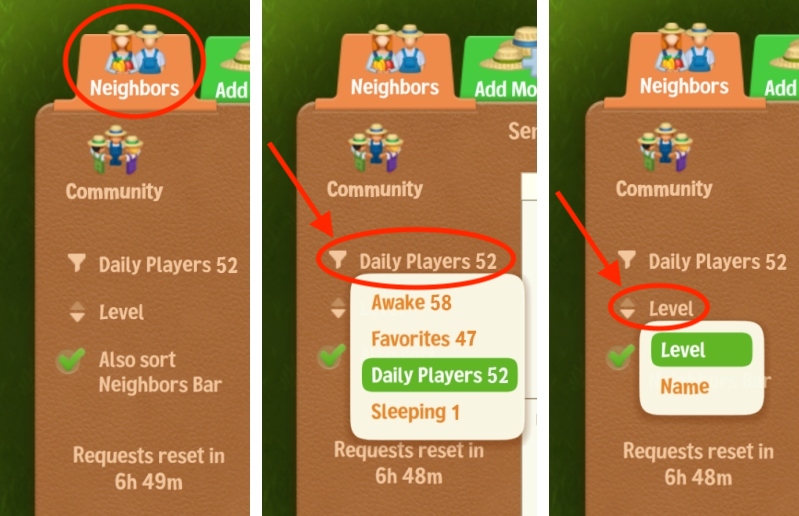
In the Neighbors tab you can:
- Filter → Click Daily Players to choose from Awake, Favorites, Daily Players or Sleeping.
- Sort → Click Level to sort by Level or Name. Use the up/down arrows to switch direction (high to low / low to high or A–Z / Z–A).
- Check “Also sort Neighbors Bar” to apply the same sort to the Neighbors bar.
Neighbor Key
Neighbor Key is a unique 6-digit code generated automatically for you. It appears at the bottom part of your “Add More!” tab.
You can give your key to anybody, and they can send you invites, or you can invite them to be your Neighbor, if they give you their Neighbor Key.
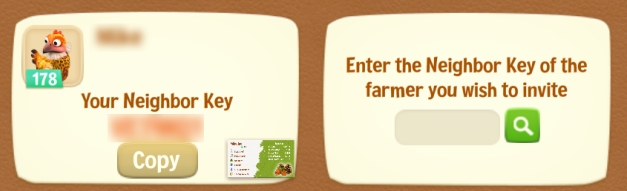
You can also enter the Neighbor key of a farmer you wish to invite (right side of photo).
Of course, if you post your Key on groups, you might get LOTS of Neighbor requests, so WE ADVISE GIVING THE NEIGHBOR KEY ONLY IN PRIVATE MESSAGES, NOT ON FACEBOOK GROUPS.
Disable “Appear in search for Neighbors”
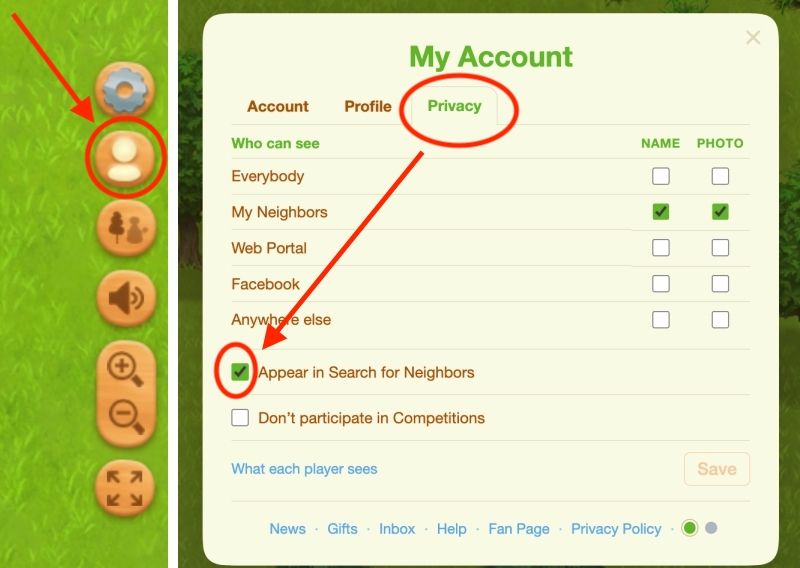
If you don’t want to use this option to add neighbors without having to be friends with them on Facebook, you can uncheck “Appear in Search for Neighbors”.
Go to My Account → Privacy tab → uncheck “Appear in Search for Neighbors”.
Farm Chat
You can try our in-game Farm Chat above your Neighbors bar, and ask people to add you as a Neighbor by giving them your Neighbor Key.
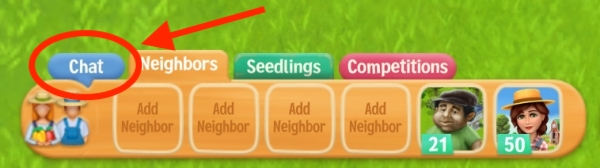
The Farm Chat has two main channels (Help & Barn), several language options, and a few Themes you can choose from.
Tip: You can see your Neighbor stats at the top right of the game window when visiting their farms or by hovering over their icon in the Neighbors bar.
Tip: You can also see stats for Farm Chat members by hovering over their name.
Try our Game Page or CLM groups
You can also try our Game Page: https://www.facebook.com/CountryLifeMeadows or search dedicated Country Life Meadows groups and ask people to add you as a neighbor — you either have to be Facebook friends first, or give them your Neighbor Key (in which case try to do it privately to avoid receiving lots of requests).