To comply with platform policies, the News and Help sections have been moved outside the game.
You can find buttons for News, Help, and our Fan Page at the bottom of the My Account page.
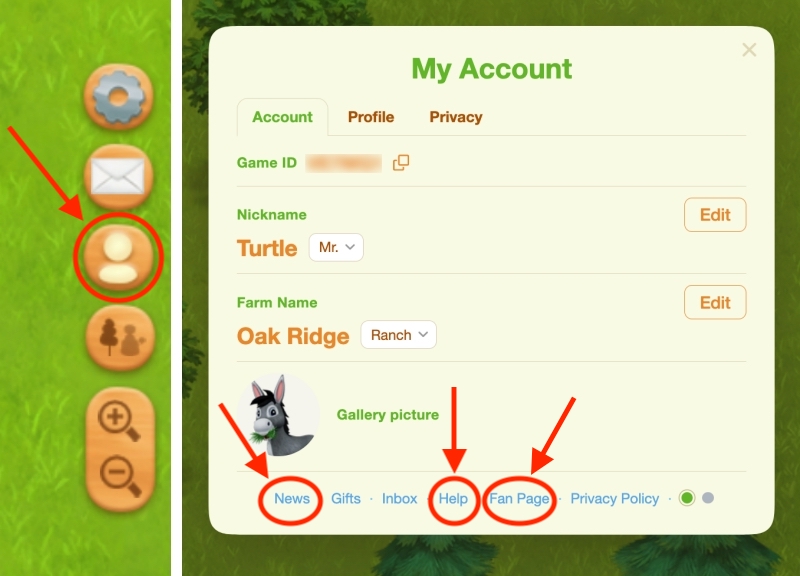
Because the platform now does not allow direct links to be opened from inside the game, clicking one of these buttons will show a popup containing the page’s URL (the link).
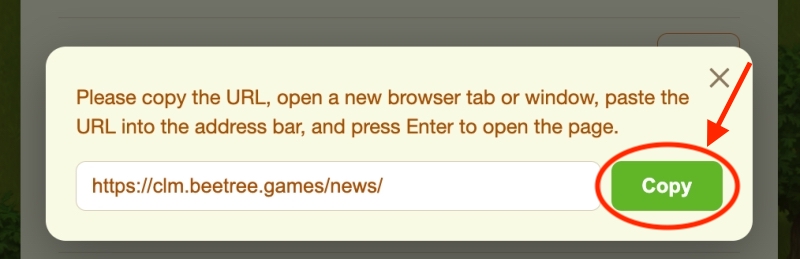
- Click the green Copy button.
- Open a new browser tab or window.
- At the top of the new tab, find the address bar (where website addresses are shown).
- Right-click inside the address bar and choose Paste.
- Press Enter on your keyboard to open the page.
Our pages are also below — you can click the links directly.
News — https://clm.beetree.games/news/
Help — https://clm.beetree.games/
Fan Page — https://www.facebook.com/CountryLifeMeadows
Accessing the Fan Page from the game
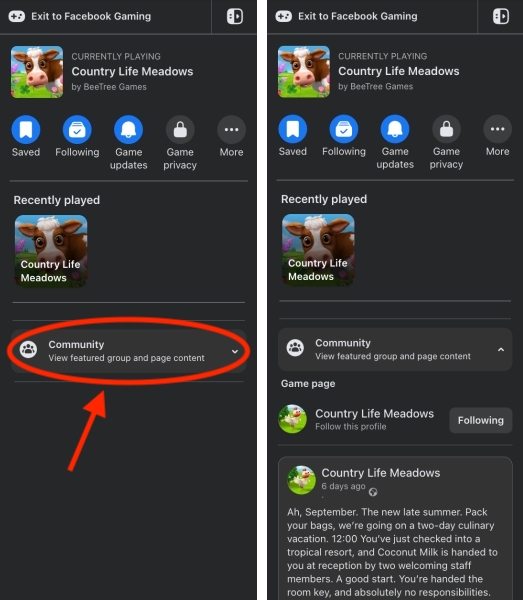
You can also access our Fan Page directly from the game.
Open the Community tab in the sidebar. The latest post from Country Life Meadows Game Page will be displayed there.